
HHAeXchange+
Homecare Software Solutions LLCBusiness
3.81.27K Reviews
- Version
- 26.10.04
- Installs
- 100.00K
- Age Rating
- Everyone
Screenshots
Our Review of HHAeXchange+
 Analysis by Appyee
HHAeXchange+ is the kind of business app I would judge less by flashy presentation and more by whether it helps a caregiver get through a workday without losing time. Designed for caregiver users in Illinois, Massachusetts-SD, Michigan, and Texas, it sits in a very specific part of the home-care workflow rather than trying to be a general productivity tool. That focus is its main advantage, but it also means the app makes the most sense when your agency and care program already use the HHAeXchange system.
I tested it with that practical question in mind: can a caregiver use it reliably when moving between visits, checking work details, and dealing with the small interruptions that happen during a normal shift? My overall impression is positive, though not effortless. The app can be useful when it is connected to the right organization and configured correctly, but a new user may initially wonder whether a problem comes from the app, their account, their phone, or the agency’s setup.
What HHAeXchange+ is really useful for
Homecare Software Solutions LLC developed this free business app for a defined group of users rather than the general public. Its store summary identifies it as a caregiver app for users in IL, MA-SD, MI, and TX, so the first decision is not whether it looks convenient; it is whether your employer or care program expects you to use it. If your workplace does not operate through the relevant HHAeXchange workflow, installing it may not solve anything.
The app is available to everyone in terms of its content rating, but that does not mean it is equally useful for everyone. A family member arranging occasional help, an independent caregiver without an agency connection, or someone searching for a general calendar and time tracker will probably get more value from a simpler tool. HHAeXchange+ is aimed at people whose work information is managed within a participating care system.
That distinction matters because many first-time users expect an app to become useful immediately after installation. In this case, the account relationship is central. The app is better understood as a mobile doorway into an existing care-work process, not as a standalone replacement for scheduling software, payroll software, messaging apps, and personal notes all at once.
Its current version is 26.08.01, and the app requires at least iOS or Android equivalent to version 10, depending on the device platform. I would check that requirement before troubleshooting anything else. An older phone can create confusing symptoms, including slow screens, failed updates, or behavior that looks like an account issue when the real problem is compatibility.
Where new users commonly get stuck
The most likely point of friction is the first sign-in or account connection. Caregivers may have received instructions from a supervisor, but small differences in the name, phone number, email address, or organization record can prevent a smooth start. I would avoid repeatedly creating new accounts or changing details at random. That can make it harder to tell whether the original issue was a typing mistake or an account that still needs agency-side activation.
A better first step is to compare the login information with the exact details supplied by the employer. Pay attention to spaces, punctuation, capitalization, and whether the organization expects a particular sign-in route. If the app opens but does not show the expected work information, that is not automatically a sign that the installation failed. It may indicate that the account is not yet linked to the correct caregiver record or that the agency has not completed its part.
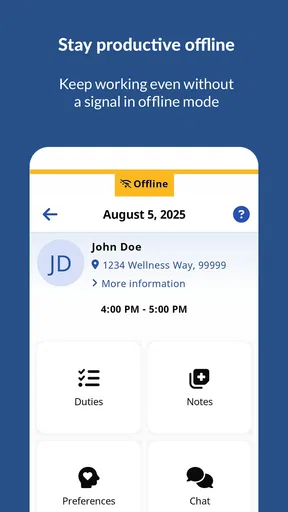
Another common trap is judging the app while using a poor connection. Caregivers often work in homes, buildings, rural areas, or neighborhoods where mobile reception changes from room to room. A screen that loads slowly at one visit may work normally later. Before repeating an action several times, I would wait briefly, move to a more reliable connection if practical, and reopen the relevant screen carefully. Repeated taps can create uncertainty about whether an action was accepted once or several times.
Notifications and phone settings can also affect the experience. If the app is expected to alert you but nothing appears, check the device’s notification settings and make sure the app is not being restricted by a battery-saving mode. This is a general phone check rather than a claim about a special HHAeXchange+ setting, but it is often worth doing before assuming that the service itself is unavailable.
Setup checks that save time later
I recommend setting up the app before the first urgent visit rather than during a rushed arrival. Open it when you have enough time to confirm that you can reach the correct account area and recognize the work information you expect to see. This simple rehearsal is more useful than merely installing the app and assuming everything is ready.
Keep the phone’s date and time set automatically unless your organization gives a specific reason not to. Care-related records can be sensitive to timing, and a device clock that is manually wrong can make ordinary actions look suspicious or out of sequence. I would also keep the operating system reasonably current within the device’s supported range and leave enough storage for normal app updates.
Before relying on the app away from home, test the same phone connection you normally use during visits. If you regularly move between Wi-Fi and mobile data, try both. The purpose is not to perform a technical benchmark; it is to learn whether your usual work locations have predictable weak spots. That knowledge helps you distinguish a local connection problem from a broader service problem.
One useful habit is to record the exact time and place when something goes wrong, along with what you were doing immediately beforehand. “It did not work” is difficult for anyone to investigate. “The screen stopped responding after I changed connections at a visit” gives your supervisor or support contact a much clearer starting point. Avoid recording sensitive client information in personal notes; a simple description of the technical event is enough.
I would also confirm who handles account problems before the first shift. The app developer is Homecare Software Solutions LLC, but your employer or care program may be the party that controls the caregiver record and work assignment. Knowing whether to contact a supervisor, agency administrator, or technical support channel prevents the common mistake of waiting for an app update to fix an account that only the organization can correct.
Recovering when a workflow breaks
When an action appears to fail, my preferred recovery method is deliberately conservative. First, pause and check whether the screen has changed, whether a confirmation appeared, or whether the information is already reflected elsewhere in the app. Then retry once, not repeatedly. This reduces the chance of duplicating an action or creating conflicting records.
If the app becomes unresponsive, close and reopen it after noting what you were trying to do. A restart can clear a temporary display problem, but it cannot repair an incorrect account assignment or missing work information. That distinction is important: restarting is a reasonable first aid step, not a universal solution.
For a connection-related problem, I would move between Wi-Fi and mobile data only when it is safe and permitted, then try again after the connection stabilizes. If the same failure continues across a reliable connection, the next useful step is to capture the wording of any error message and contact the appropriate workplace channel. Screenshots can help, but they should be handled carefully so that private client information is not exposed unnecessarily.
Reinstalling is a more disruptive step than many people realize. It may remove local app state and force another sign-in, so I would not make it the first response during a visit. If an administrator or support contact recommends reinstalling, make sure you know the correct login details and any workplace instructions before proceeding. The goal is to restore access without turning a temporary problem into a longer account-recovery task.
A practical workaround is to keep a small, non-sensitive reminder of the steps your agency expects when the app is unavailable. That reminder should not replace official records or encourage you to invent times, visits, or confirmations. It simply helps you remember whom to contact and what details to report. In a care setting, accurate follow-up is more important than pretending that a missing app action succeeded.
When the app is not the cause
It is easy to blame the visible app because it is the part of the process on the phone. However, several problems can happen outside the app itself. An assignment may not yet be available in the connected account. A caregiver record may contain outdated contact information. An agency may need to approve or correct something before the mobile view can display it. In those situations, deleting and reinstalling the app is unlikely to help.
Here is a realistic example. Imagine I arrive for a morning home-care visit and expect to see the relevant work item, but the app shows nothing. The phone has a stable connection, the app opens normally, and I can sign in. That pattern points less toward an installation failure and more toward an account, assignment, or organization-side issue. I would check that I am using the intended account, avoid guessing at missing details, and contact the workplace person responsible for the record.
The opposite situation is also possible. If the app fails only in one building while other phone functions are slow too, the local connection or device may be responsible. If the app works after moving to a stronger signal, that is useful evidence. If every other app works but HHAeXchange+ repeatedly shows the same error, the service or account becomes more likely. This kind of comparison is more reliable than assuming that every failure has the same cause.
Privacy adds another layer of judgment. Because this is a caregiver-focused business app, I would treat screens and notifications as potentially sensitive even when the phone is shared with no one else. Use a device lock, avoid leaving work information visible in public, and do not send screenshots containing client details through casual personal channels. These are sensible handling practices for care work, regardless of whether a particular problem is technical.
The app is also not a substitute for every tool a caregiver may need. A personal calendar can be better for remembering non-work commitments. A phone call may be better for an urgent clarification with a supervisor. Paper notes may be necessary as a temporary personal reminder in a low-signal location, though they should not replace the official process. HHAeXchange+ is most valuable when it handles the part of the workflow it was intended to handle, while other tools cover unrelated needs.
Who will benefit most from it
I would recommend HHAeXchange+ to caregivers in the supported state and program environments whose agency specifically directs them to use it. For those users, having a mobile route into the work system can be more practical than relying on a desktop computer or trying to coordinate everything through text messages. The app’s value comes from fitting into an established care workflow.
It can be especially helpful for someone who moves between several client homes and needs to deal with work information while away from a desk. The phone format suits that reality better than a desktop-only system. Still, convenience depends on preparation: a charged phone, a dependable connection when possible, correct account details, and a clear understanding of what to do if something fails.
I would be more cautious about recommending it to a caregiver who expects a fully independent scheduling tool. If your organization has not connected your account, the app may feel empty or confusing even though it is installed correctly. Likewise, people looking for a broad employee time-management app, a client-management platform for their own private business, or a general task list should look elsewhere.
The public reception suggests a reasonably established user base, with an average rating of 4.1 from around 2.6 thousand ratings and more than 100 thousand installs. I see that as evidence that the app is being used at a meaningful scale, not as a guarantee that every caregiver will have the same experience. Workplace configuration and local support can matter as much as the app itself.
How it compares with familiar alternatives
Compared with a normal calendar, HHAeXchange+ is more relevant to a connected caregiver workflow but less flexible for personal planning. A calendar lets me arrange anything, yet it does not automatically become the official place for agency-related information. Using a personal calendar alone may help me remember a visit, but it cannot replace whatever confirmation or recordkeeping process my workplace requires.
Compared with text messages, the app offers a more structured destination for work information. Texting can be fast for a question, but conversations become difficult to search and easy to misunderstand when schedules change. On the other hand, a message or phone call remains the better choice when an urgent issue needs a human decision, especially if the app is unavailable or the information shown does not match what I was told.
Compared with a desktop portal, the mobile app is naturally better suited to caregivers who are already traveling between visits. A desktop can be more comfortable for reviewing a larger amount of information, depending on the organization’s process, while the phone is easier to carry. I would not treat the two as enemies; the right choice depends on whether I am managing a quick work task in the field or reviewing information at a desk.
The important trade-off is specialization. HHAeXchange+ is not trying to be a universal organizer, and that is good when the supported care system is exactly what I need. It is less attractive when I want freedom to customize every part of my workflow. In that case, a general business app may feel easier, but it may also leave me responsible for manually keeping official and personal records aligned.
My practical verdict after using it
HHAeXchange+ earns a cautious recommendation for its intended audience. It is free, focused on caregiver work in specific supported locations, and available for everyone by age rating. The strongest reason to install it is not the app alone; it is the combination of the app and an agency workflow that expects it.
My main advice is to treat setup as part of the job, not as a five-minute download. Confirm the correct account, test access before a shift, check the phone and connection, and learn who can resolve organization-side issues. These steps address the problems that create the most wasted time and also make it easier to recognize when the app itself is not responsible.
There is some unavoidable friction in depending on a connected system. A missing assignment, weak signal, outdated device, or incorrect account detail can make the experience feel unreliable even when the software is functioning normally. That is why I would not recommend it as a standalone solution for people outside the supported caregiver environments.
For a caregiver whose employer already uses HHAeXchange, however, the app is worth trying and keeping ready on a compatible phone. Its current release, 26.08.01, gives users a clear mobile option, while the established rating and install base show that it is not an obscure experiment. I would use it as the official mobile part of my work routine, keep a sensible recovery plan for connection or account problems, and use other tools only for tasks that genuinely sit outside its purpose.
Privacy and Permissions
See what permissions an app requests and how it handles your data.
- Location
- approximate location (network-based), precise location (GPS and network-based)
- Camera
- take pictures and videos
- Microphone
- record audio
- Other
- view network connections, full network access, run at startup, reorder running apps, prevent device from sleeping
Verdict
Strengths of HHAeXchange+
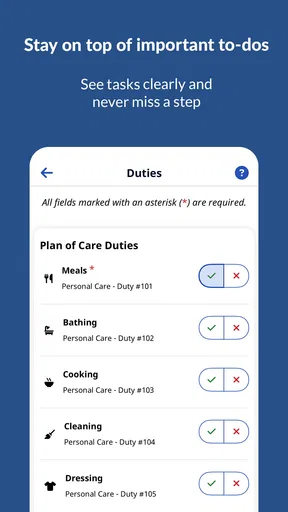
- Centralizes caregiver schedules, tasks, and visit details in one mobile app.
- Helps agencies monitor field staff activity and service delivery more efficiently.
- Mobile access makes it practical for caregivers working across multiple client locations.
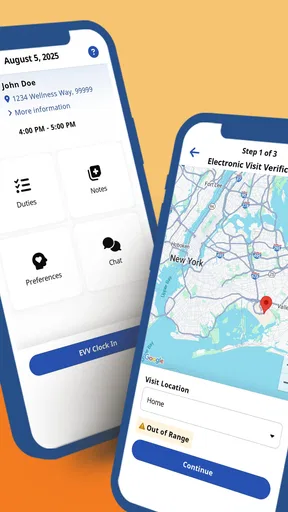
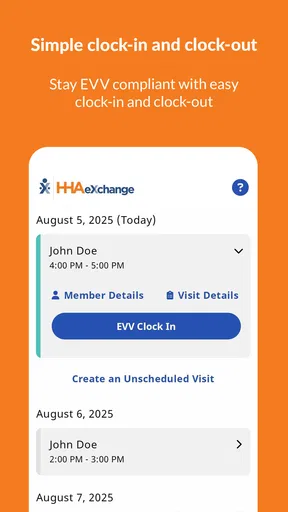
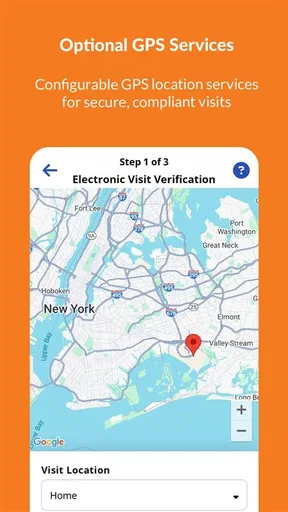
- Supports electronic visit verification for improved compliance and billing accuracy.
- Can reduce paperwork by replacing several manual reporting and communication steps.
Limitations of HHAeXchange+
- Many features depend on an agency’s HHAeXchange setup and enabled permissions.
- Caregivers may need training before navigating all workflows confidently.
- Login or connection problems can disrupt time-sensitive visit documentation.
- Frequent updates may change menus or require users to relearn parts of the app.
- Battery and mobile data usage may increase during location-based visit tracking.
Similar Picks in This Category
View All
LinkedIn: Community & Network
LinkedIn3.8

Zoom Workplace
zoom.com4.1

Microsoft Teams
Microsoft Corporation4.6

Meta Business Suite
Meta Platforms, Inc.4.6

Webex Meetings
Cisco Systems, Inc.4.5

TeamViewer Remote Control
TeamViewer4.4
Frequently Asked Questions
What is HHAeXchange+ used for?
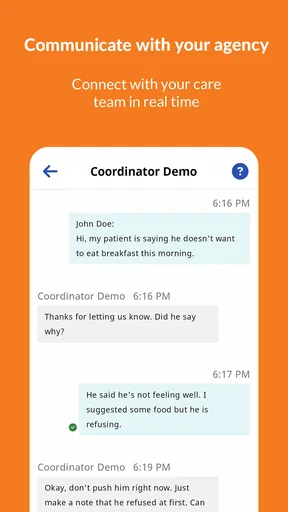
HHAeXchange+ is a mobile application designed to support home healthcare workers and agencies with everyday care-management tasks. Depending on the user’s role and agency setup, it may allow caregivers to review schedules, confirm visits, document services, communicate with coordinators, and submit required information from a phone. Available features can vary because access is usually connected to an organization’s HHAeXchange account.
Who can use the HHAeXchange+ app?
The app is primarily intended for authorized users working with organizations that use the HHAeXchange platform, including caregivers, home health aides, coordinators, and agency staff. It is not generally a standalone app for patients or the public. Before downloading, you should confirm that your employer or healthcare organization supports HHAeXchange+ and has provided the correct login credentials or enrollment instructions.
Does HHAeXchange+ require an account or invitation?
Yes, access normally requires an account associated with a participating agency, payer, or healthcare organization. Installing the application alone may not be enough to use its features. Your organization may need to activate your profile, assign permissions, and provide login details or an invitation. If you cannot sign in, the most appropriate solution is usually to contact your agency administrator rather than creating multiple new accounts.
Can caregivers use HHAeXchange+ to clock in, clock out, or document visits?
HHAeXchange+ may support electronic visit verification and other documentation functions, such as recording visit times, confirming service details, and submitting notes, depending on the program and permissions configured by the agency. Location services, an internet connection, and accurate device settings may be required for certain actions. Users should follow their employer’s procedures because available options and compliance requirements can differ by region.
Is HHAeXchange+ free to download, and what should I know about privacy?
The application may be available to download without a separate purchase, but its practical use depends on access provided through a participating organization. Because the app can handle employment, scheduling, visit, and healthcare-related information, users should review the privacy policy and keep the phone protected with a secure lock. Avoid sharing login details, and install updates from the official Android or iOS store whenever possible.
